



Affiliate Marketing for Beginners

Affiliate Marketing for Beginners

Wealthy Affiliate

Affiliate marketing is one of the simplest ways to start earning money online, making it an excellent choice for beginners.

By promoting products or services and earning commissions from successful referrals, you can generate income without creating your own product. The low startup costs, flexibility, and scalability of affiliate marketing make it appealing for those looking to start an online business.

In this article, I’ll guide you step-by-step on how to get started, and we’ll also explore how platforms like Wealthy Affiliate can help you achieve your goals.

What is Affiliate Marketing?

Affiliate marketing is a performance-based business model where you, the affiliate, promote products or services and earn a commission for every sale or action (like signing up for a service) made through your unique affiliate link.

Key Players in Affiliate Marketing:

  • Affiliate (Marketer): Promotes the product or service.
  • Merchant (Product Owner): Offers the product or service and provides an affiliate program.
  • Consumer (Buyer): Purchases the product through the affiliate link.

The process is simple:

  1. You join an affiliate program.
  2. You promote their products/services via your platform (website, social media, etc.).
  3. You earn commissions when users click your links and make a purchase.

How Does Affiliate Marketing Work?

  1. Sign up for an affiliate program – Examples include Amazon Associates, ClickBank, and ShareASale.
  2. Choose products/services – Select items relevant to your audience and niche.
  3. Promote your affiliate links – Use your website, blogs, YouTube, or social media to drive traffic.
  4. Earn commissions – Get paid for successful referrals, often a percentage of sales.

Why Affiliate Marketing is Beginner-Friendly

  • No product creation required: You only promote existing products.

  • Low startup costs: Often free to join programs.

  • Flexible: You can work part-time or scale it into a full-time business.

  • Accessible to anyone: All you need is an internet connection and basic marketing skills.
Affiliate marketing for beginners is fun

How Wealthy Affiliate Can Help You Get Started

Wealthy Affiliate is an all-in-one platform designed to support beginners in affiliate marketing. It provides the tools, training, and community you need to succeed, whether you’re starting from scratch or looking to grow your affiliate business.

Key Features of Wealthy Affiliate:

  1. Comprehensive Training:
  • Step-by-step lessons on how to build an affiliate business.
  • Tutorials on creating content, driving traffic, and mastering SEO.
  • Focus on practical implementation with easy-to-follow modules.
  • Website Building Tools:
    • Free access to website-building tools like SiteRubix.
    • Hosting services included, so you don’t need to worry about technical setup.
  • Affiliate Program Directory:
    • A curated list of affiliate programs in various niches.
    • Helps you find profitable opportunities tailored to your audience.
  • SEO and Marketing Tools:
    • Tools to help you optimize your website for search engines.
    • Training on driving traffic through both free and paid methods.
  • Community Support:
    • Access to a community of experienced and beginner marketers.
    • Get help, feedback, and motivation from like-minded individuals.
  • Low Cost to Start:
    • Free trial available to explore the platform.
    • Premium memberships provide additional features and training at affordable rates.

    Wealthy Affiliate simplifies the process of learning affiliate marketing, making it a perfect choice for beginners who need guidance and tools in one place.

    Wealthy Affiliate

    Step-by-Step Guide to Getting Started with Affiliate Marketing

    1. Choose a Niche
    • Focus on a specific audience (e.g., fitness, tech, or personal finance).
    • Wealthy Affiliate’s training can help you identify profitable niches.
  • Find Affiliate Programs
    • Join reputable programs such as Amazon Associates, or use Wealthy Affiliate’s directory to explore options.
  • Build a Website
    • Create a professional-looking website with SiteRubix through Wealthy Affiliate.
    • Write quality content related to your niche.
  • Promote Products
    • Use blogs, tutorials, and reviews to introduce products.
    • Wealthy Affiliate teaches effective content creation strategies.
  • Drive Traffic to Your Site
    • Utilize Wealthy Affiliate’s SEO training to rank high on search engines.
    • Learn to use social media and email marketing to increase visibility.
  • Monitor and Optimize
    • Track your performance using tools like Google Analytics.
    • Wealthy Affiliate provides insights into optimizing campaigns.

    Tips for Success in Affiliate Marketing

    • Focus on solving problems: Provide value to your audience.
    • Build trust: Promote products you genuinely believe in.
    • Be consistent: Regularly create engaging content.
    • Leverage training: Take full advantage of Wealthy Affiliate’s resources.

    Common Mistakes to Avoid

    • Choosing a niche that’s too broad.
    • Promoting poor-quality products.
    • Overloading your site with affiliate links.
    • Not tracking and adjusting your performance.

    More Information

    Here are some links for more information about affiliate marketing:-

    Affiliate Marketing Is Evolving

    Amazon Associates Program – popular and easy to start with

    Awin– wide variety of affiliate programs

    ClickBank – ideal for digital products

    Google Analytics – to track your site performance

    Introduction To Affiliate Marketing

    Conclusion

    Affiliate marketing is a great way for beginners to enter the online business world. It offers a low-cost, flexible path to generating income online.

    Affiliate marketing is a journey, not a sprint. Whether you’re still exploring your niche or already have your first affiliate link, you’re taking real steps toward building your online business.

    With platforms like Wealthy Affiliate, you can get the training, tools, and support needed to succeed in this venture. Whether you’re building a website, learning SEO, or finding the best affiliate programs, Wealthy Affiliate provides everything in one place to help you achieve your goals.

    Start your affiliate marketing journey today with Wealthy Affiliate. Take advantage of their free trial to explore the tools and training, and begin building your online business step by step!

    Have you tried affiliate marketing yet? Or are you just getting started?
    I’d love to hear your thoughts, wins, or questions in the comments below—let’s learn together!

    Here’s a little transparency: My website contains affiliate links. This means if you click and make a purchase, I may receive a small commission. Don’t worry, there’s no extra cost to you. It’s a simple way you can support my mission to bring you quality content.

    A Beginner’s Roadmap to Building Your First Website

    A Beginner’s Roadmap to Building Your First Website

    Embarking on the journey of building your first website can be both exciting and overwhelming.

    This guide will walk you through each step to ensure a smooth start.

    By the end of this, you’ll have your very own website up and running. Let’s get started!

    New website

    Step 1: Define Your Purpose and Goals

    First things first: Why are you building a website?

    • Is it a personal blog to share your thoughts?
    • A portfolio to showcase your work?
    • A small business site to attract customers?

    Knowing your purpose will shape every decision you make, from design to content. Once you know the “why,” think about the goals for your website. Do you want to:

    • Share your expertise?
    • Attract new clients?
    • Sell products or services?

    Lastly, consider your audience.

    Who are they?

    What are they looking for?

    Write down a few things your website visitors might expect from you. This will help you stay focused as you plan.

    Step 3: Design Your Website

     Now it’s time to bring your vision to life!

    Choose a Website Platform

    You’ve got some of options here:

    1. Website Builders 
    • Examples: Wix, Squarespace, Weebly. 
  • Content Management Systems (CMS) 
    • Example: WordPress.  I love using Word Press and use the premium theme called Divi from Elegant Themes.  But there are so many free themes.


    WA starter

    Select a Theme or Template

    Selecting a memorable and relevant domain name is a crucial step in building your first website, as it sets the tone for your brand

    When building you first website, themes or templates determine how your site looks. Most platforms offer free and paid options. Pick one that matches your style and is mobile-friendly (because everyone uses their phones these days).

    Keep It Simple

    Stick to clean, easy-to-read fonts, high-quality images, and a layout that’s easy to navigate. Less is more when it comes to good design.

    Step 4: Develop Your Website

    This is where your site starts to take shape.

    Add Content

    Think about what information your audience needs. Write short, engaging text for each page. Avoid long blocks of text—break it up with headings, bullet points, and images.

    Install Plugins or Widgets

    If you’re using a platform like WordPress, plugins can add functionality to your site. Some essential ones to consider:

    • SEO tools (like Yoast SEO) to help people find your site.
    • Security tools to keep hackers away.
    • Contact forms so visitors can reach out to you.

    Step 5: Test and Optimize

    Before you launch, let’s make sure everything works smoothly.

    Test Your Site

    Check all your links, buttons, and pages. Does your site load quickly? Is it easy to read on a phone? You can use free tools like Google’s PageSpeed Insights to test performance.

    Get Feedback

    Share your site with friends or family and ask for honest feedback. A fresh pair of eyes can catch things you might have missed.

    Optimize for SEO

    SEO (Search Engine Optimization) helps your site appear in search results. Focus on:

    • Adding relevant keywords to your text.
    • Writing clear page titles and descriptions.
    • Including “alt text” for images so search engines understand them.

    Step 6: Launch and Maintain

    You’re almost there—time to share your website with the world!

    Launch Your Site

    Double-check everything before going live:

    • Is your content polished?
    • Do all links work?
    • Have you backed up your site?

    Once you’re ready, hit that publish button. Congratulations, you’re live!

    Promote Your Site

    Tell the world about your website! Share it on social media, add it to your email signature, or even write a blog post announcing your launch.

    Keep It Updated

    A website isn’t a “set it and forget it” deal. Regularly update your content, fix broken links, and add fresh material to keep visitors coming back.

    By following this roadmap, building your first website becomes a manageable and rewarding project, laying the foundation for your online presence

    Extra Bits

    1. What You’ll Need Before You Start

    • A clear idea of your website’s purpose (blog, business, portfolio, etc.)

    • A name for your website (you’ll need this to choose a domain)

    • Some content ideas or starter images

    • Willingness to learn and test things out

    2. Choosing a Website Builder

    • WordPress.org (most flexible, but needs hosting)

    • Wix or Squarespace (drag-and-drop and beginner-friendly)

    • Wealthy Affiliate (if you want hosting, training, and community in one place)

    If you’d like a beginner-friendly all-in-one platform to host, build, and learn how to grow your site, I personally recommend Wealthy Affiliate. It’s where I got started, and it’s especially helpful if you’re feeling a bit unsure of the tech side of things.

    3. Hosting and Domains in Simple Terms

    • Domain name = your address on the web

    • Hosting = your plot of land where your website lives

    Think of your domain as your shop’s street address, and your hosting as the actual building your shop sits in.

    4. The Importance of Starting Simple

    You can always change your design, colours, or layout later—so don’t let decision overwhelm stop you from hitting that ‘Publish’ button.

    And Finally...

    And there you have it—your beginner’s roadmap to building your first website!

    Building your first website is a significant milestone, and it’s natural to have questions or encounter challenges along the way. Have you started creating your site, or are you still in the planning stages? Share your experiences, tips, or questions in the comments below—I’d love to hear your journey and help where I can!

    Remember, it’s okay to take it one step at a time. Your first website doesn’t have to be perfect; it just has to exist. The more you work on it, the better it will become.

    So what are you waiting for? Start building your dream website today!

    If you pop over to Wealthy Affiliate, Kyle will lead you through the process so easily.

    Here’s a little transparency: My website contains affiliate links. This means if you click and make a purchase, I may receive a small commission. Don’t worry, there’s no extra cost to you. It’s a simple way you can support my mission to bring you quality content.

    How to Create Captivating Content for Your New Website

    How to Create Captivating Content for Your New Website

    If you’re launching a new website, understanding how to create captivating content is essential to attract and retain visitors

    Starting a new website can be exciting, but also a little overwhelming.

    One of the most important elements of a successful site is content but not just any type of content.  It needs to be captivating content. It’s the heart of your website, helping you attract visitors and keep them engaged.

    If you’re a complete beginner, don’t worry—this guide will walk you through the basics of creating content that grabs attention and delivers value.


    1. Understanding Your Audience

    To create captivating content, start by identifying your target audience’s needs and preferences

    This step is key because your content should speak directly to their needs and interests.

    • Ask yourself: Who will visit my website? What are they looking for? What problems can I help them solve?
    • Example: If your website is about gardening, your audience could be beginners looking for simple tips or experienced gardeners seeking advanced techniques.

    By knowing your audience, you’ll be able to create captivating content that feels relevant and helpful to them.

    Gardening Website

    2. Choosing the Right Tone and Style

    The tone and style of your content set the mood for your website. Do you want to sound professional, casual, or friendly?

    • Keep your tone consistent across all pages.
    • Example: A travel blog might use a friendly, conversational tone, while a legal advice site might lean toward a more formal style.

    This is where knowing your audience is so useful.  Write as if you’re speaking directly to your reader. This makes your content feel personal and approachable.

    3. Crafting a Clear and Engaging Homepage

    Your homepage is like the front door of your website—it’s the first thing people see, so make it count!

    • Headline and tagline: Keep them clear, concise, and engaging.
      • Example: “Easy Gardening Tips for Beginners” is better than “Learn to Garden.”
    • Add a call-to-action button that guides visitors, like “Start Here” or “Read More.”

    A well-written homepage sets the stage for the rest of your site and encourages visitors to explore further.

    4. Structuring Your Content for Readability

    To create captivating content, start by identifying your target audience’s needs and preferences.  People often skim websites rather than reading every word. To make your content easy to digest:
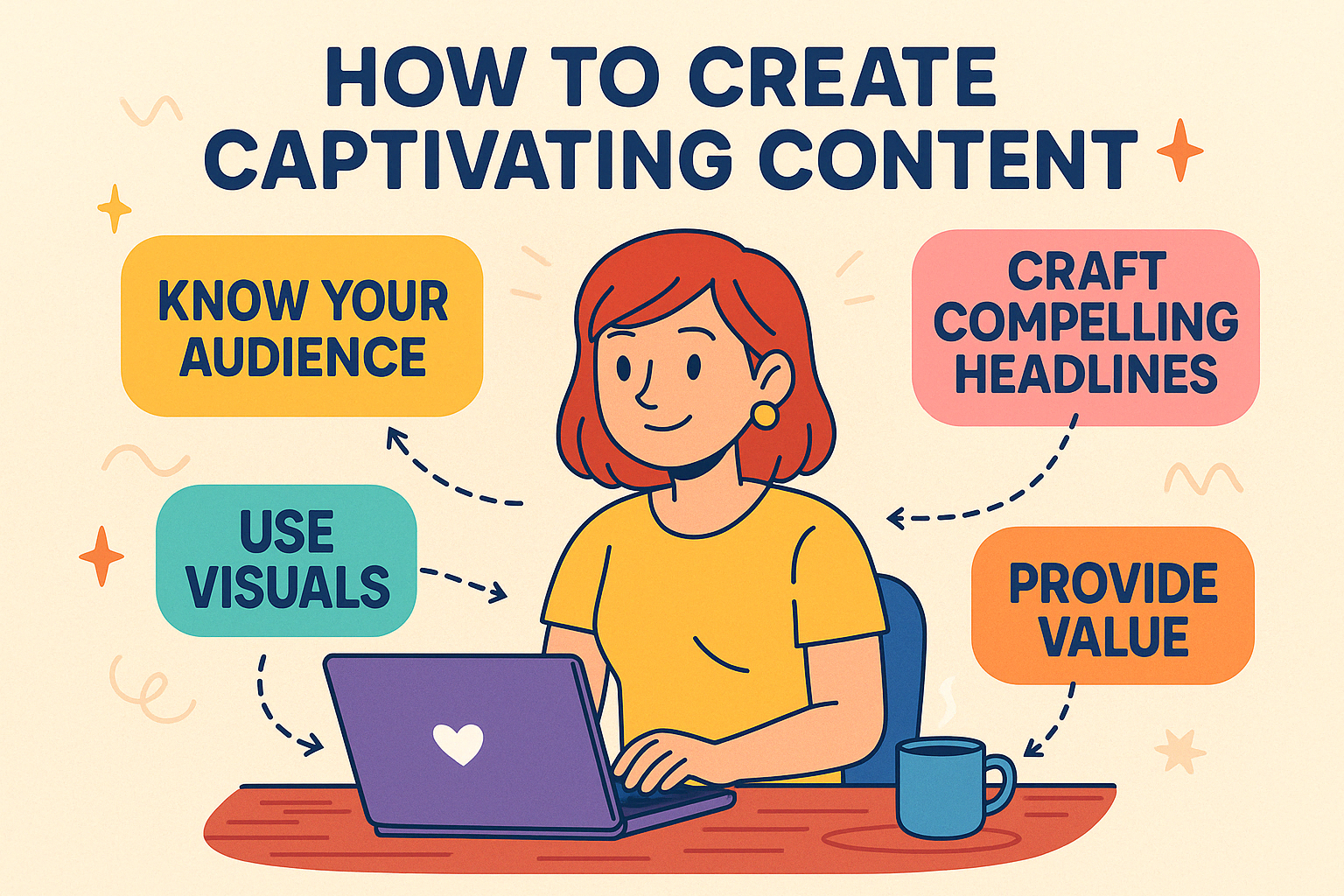
    create captivating content
    • Use short paragraphs, bullet points, and subheadings.
    • Avoid technical jargon—keep your language simple.
    • Example: Instead of saying, “Optimize your horticultural techniques,” say, “Improve your gardening skills.”
    • Break up long text with headings and lists to keep things visually appealing and reader-friendly.

    5. Writing About Your Products, Services, or Blog Posts

    When writing about what you offer, focus on how it benefits your audience.

    • Emphasize benefits: Instead of “This gardening tool has a handle that is 12 inches long,” write, “This tool makes it easier to dig deep into your garden soil.”
    • Address common questions or problems your audience might have.
    • Use storytelling to make your content relatable and memorable.

    6. Incorporating Keywords Naturally

    Keywords are the words or phrases people type into search engines. Using them in your content helps your website get found online.

    • Find keywords: Use free tools like Google’s autocomplete to see what people search for.  Give Jaaxy a go.  It’s the one I use all the time.
    • Use keywords naturally—don’t force them. Write for your readers first, and search engines second.

    7. Using Images To Make Your Content Shine

    A picture is worth a thousand words, and the right visuals can make your content even more engaging.

    • Pair your text with relevant images, videos, or infographics.
    • Choose high-quality visuals that match your website’s theme.
    • Example: For a food blog, include photos of your recipes.

    Visuals break up text and make your website more visually appealing.
    A picture is worth a 1000 words

    8. Encourage Engagement

    Great content invites interaction. Make it easy for your audience to connect with you.

    • Add a comment section or contact form where visitors can share feedback or ask questions.
    • Encourage sharing: Include buttons for social media sharing.
    • Example: “Have a gardening tip to share? Leave a comment below!”

    Engagement helps build a sense of community around your website.

    9. Reviewing and Updating Your Content

    Your website is a work in progress, and regular updates keep it fresh and relevant.

    • Proofread carefully: Use tools like Grammarly to catch typos and errors.
    • Update outdated information, especially if it’s tied to trends or seasonal topics.

    Your audience will appreciate content that’s accurate and up-to-date.

    10. Staying Consistent

    Consistency is key when creating captivating content. Stick to a schedule that works for you.

    • Start small: Post once a week or even once a month, depending on your capacity.
    • Focus on quality over quantity—one great article is better than ten rushed ones.

    A consistent posting schedule builds trust and keeps visitors coming back.

    Some Extra Little Nuggets

    1. Examples of Engaging vs. Flat Content

    Not-so-captivating version:

    “We offer a range of services. Contact us for more details.”

    More captivating version:

    “Need help getting your website off the ground? I offer easy-to-follow guidance that walks you through each step—no techy talk, just simple, honest support. Ready to get started? Let’s chat!”

    Tip: Imagine you’re explaining it to a friend over a cupof tea or glass of wine. If it sounds too robotic or dull, your readers will likely feel the same.

    2. Common Mistakes to Avoid

    • Writing for search engines, not people: Yes, SEO matters—but not at the expense of sounding human. Always write for your reader first.

    • Walls of text: Long paragraphs can be off-putting. Break them up with subheadings, bullet points, or short paragraphs.

    • Forgetting your goal: Every piece of content should have a purpose—whether that’s to inform, inspire, entertain, or guide someone to take action.


    3. Quick SEO Tips for Better Content Visibility

    Even as a beginner, you can give your content a boost in search engines by:

    • Using your focus keyword (like create captivating content) in the title, subheadings, and naturally throughout the article.

    • Including internal links to other posts or pages on your site.

    • Adding a meta description—a short summary that shows up in search results.

    If you’re curious to learn more about these steps, the free training at Wealthy Affiliate is a fab place to explore the basics without feeling overwhelmed.

    4. Free Tools to Help You Write and Edit

    Writing great content doesn’t mean you have to do it all alone. These free tools can help you polish your work:

    • Hemingway Editor – Helps make your writing clear and easy to read.

    • Grammarly – Checks for grammar and spelling mistakes.

    • Canva – Great for adding visuals to your content, like banners or blog images.

    • Answer The Public – Useful for finding real questions people are searching for (helps with writing relevant content!).

    And Finally...

    By applying these strategies, you can create captivating content that resonates with your audience and supports your website’s goals

    Creating captivating content for your new website doesn’t have to be complicated. By understanding your audience, keeping your writing clear and engaging, and regularly updating your content, you can create a site that people love to visit.

    Creating content that truly engages your audience is a journey. Have you tried any of these techniques on your website? What challenges have you faced in crafting compelling content? Share your experiences and questions in the comments below—I’d love to hear your thoughts and continue the conversation!

    Remember, every successful website started somewhere—take it one step at a time, and you’ll be on your way to building something amazing.

    Good luck, and happy website building! You’ve got this!

    Here’s a little transparency: My website contains affiliate links. This means if you click and make a purchase, I may receive a small commission. Don’t worry, there’s no extra cost to you. It’s a simple way you can support my mission to bring you quality content.”
    Choosing the Best Website Theme

    Choosing the Best Website Theme

    Your website is the front door of your online presence.

    So choosing the best website theme sets the first impression visitors get when they walk through that door.

    It’s like choosing an outfit for your big interview. You want to look professional but approachable, right?

    That’s the power of a good website theme.

    Choosing the best website theme

    A website theme is more than just aesthetics. It’s the backbone that carries the design, layout, and style of your site. Think fonts, colors, and overall look. Choosing the best website theme means keeping your site intuitive and engaging, making it easy for visitors to navigate and find what they need. 

    Now, if you’re a beginner, picking a theme might feel overwhelming, it’s like choosing a dish in a crowded menu without pictures. There’s just so much to consider, like compatibility with different devices or how customisable it is.  But the right theme can make your life easier, helping you whip up a site that feels just right for your goals.

    The challenge for beginners often lies in balancing creativity with functionality. You have to consider what feels right and what works well without cluttering your page.

    It’s about keeping it simple, yet striking and ensuring your site functions like a well-oiled machine. I mean, who doesn’t want their website to be the cool, dependable friend everyone can count on?

    Website themes give your site character

    Choosing a theme isn’t just about picking what looks pretty. It’s about ensuring your site is accessible, fast, and easy to use. Remember, a theme is the first thing people notice, so defining your site’s personality and making it unforgettable should be at the top of your list. 

    Exploring the Basics: Understanding Website Themes

    When it comes to building a website, understanding the basics of themes is crucial. A theme is like the blueprint for your house—it gives structure, shape, and style to everything. But we aren’t just talking about a splash of color or a fancy font here.

    A website theme is composed of several key elements. First, there’s the layout, which maps out how the content is arranged and guides the flow from one section to another. Typography brings in the fonts, setting the mood and helping your text be readable and stylish. Then, there’s the color scheme that pulls it all together, giving your site its vibe—be it professional, playful, or anything in between.

    Platforms like WordPress, Wix, and Squarespace offer a treasure trove of themes to pick from. Each of these platforms provides unique features that can influence what themes suit your needs. WordPress is known for its flexibility and an ocean of both free and premium themes. Wix offers a more drag-and-drop style. Squarespace, on the other hand, provides polished designs with a professional edge.

    As a beginner, these platforms make it easier to focus on how to make your website look and feel. Understanding what each platform offers in terms of themes helps you tailor your choices to your specific needs, whether it’s setting up an e-commerce store or a personal blog. Think of it as picking the right ingredients; the end result depends on what you start with.

    wordpress themes 1

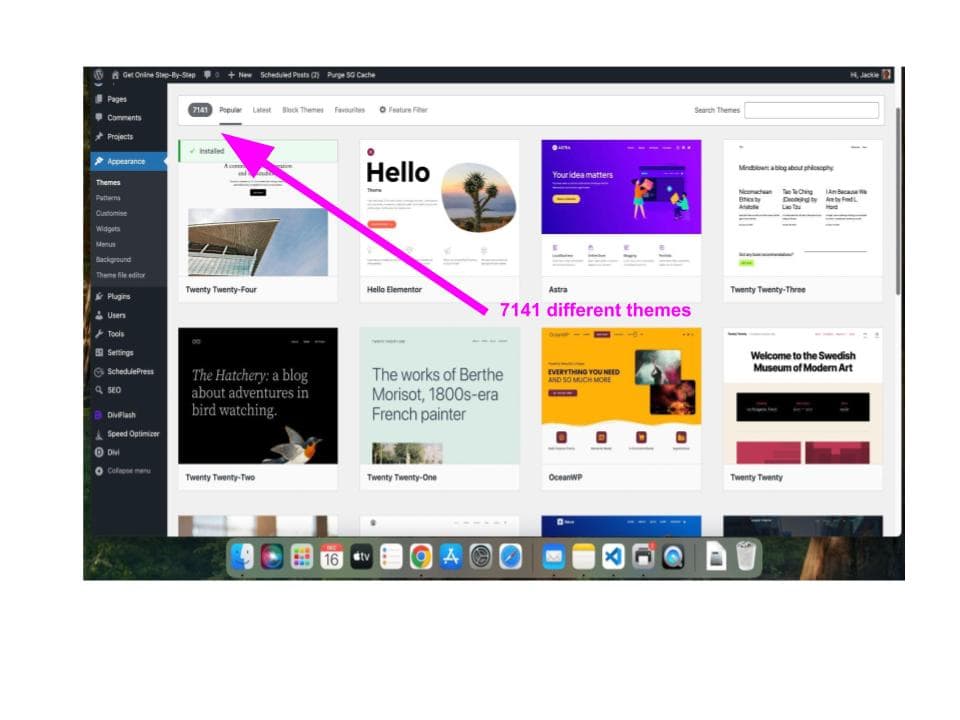
    Personally I like WordPress but that is because I learnt with it.  There are thousands of WordPress themes available as you can see in the image above.

    Aligning Themes with Goals: Identifying Your Website's Purpose

    Before diving into the sea of themes, it’s important to nail down your website’s purpose. You wouldn’t go shopping for a winter coat if you’re planning a beach holiday, right? The same rule applies here—different goals need different themes.

    Let’s say you’re setting up a personal blog. You’re looking for a theme that highlights your writing and puts content upfront. Maybe you’ve got an e-commerce dream, selling your awesome handmade crafts. That’s a whole different ballgame, requiring product showcases and an easy checkout process.

    For those building a portfolio to showcase creative work, themes that elegantly display images and projects are your best pals. Conversely, a business website needs a professional look that builds trust and showcases services efficiently.

    Matching your online goals with a theme isn’t just smart—it’s necessary if you want your site to be functional and fab. List down the must-have features that match your website’s goals. If you’re all about sharing information, focus on themes that handle blog sections or news updates seamlessly.

    Think of this step as crafting a list of prerequisites before an exam. It keeps you focused and ensures you pick a theme that supports your website’s mission without unnecessary clutter. Remember, a theme should enhance your site’s purpose, not distract from it.

    The Beginner’s Guide to Choosing the Right Platform and Theme Features

    Embarking on website creation means finding the right platform that suits your comfort level. Some people prefer the flexibility of WordPress.com, which offers a broad range of themes that cater to various functionalities, from simple blogs to complex e-commerce setups.

    For those who love a user-friendly approach, Wix’s drag-and-drop simplicity can make building a website smooth sailing. It’s perfect if you want to see your design come together visually without getting tangled up in the code. Squarespace is another great choice, giving you professional and polished templates straight out of the box.

    While selecting your platform, think about the crucial theme features that ensure your site is not only pretty but practical. Easy installation and intuitive customization are lifesavers for beginners—you want to tweak things without feeling like you’re cracking a secret code.

    Responsive design tops the list too. In today’s digital age, your site must look sharp on mobile devices. Next, explore customization options for colors, fonts, and layouts that reflect your brand or personal style. But don’t go overboard; sometimes less is more. Choose a theme offering balance and simplicity.

    Pre-built templates for specific industries can give you a head start. If you’re running a restaurant, a theme with online menus or reservations comes in handy. Search for themes that don’t bog down your site’s speed. Lightweight themes ensure faster loading, keeping visitors around long enough to explore.

    SEO-friendly features within themes help push your site up in search rankings. Integrated SEO tools can save you headaches down the line, bringing your site directly to the audience you aim to reach.

    Beginner or pro, addressing features first lets you sidestep common pitfalls and make a well-informed choice. It’s all about creating a seamless, engaging experience for visitors and a smooth building process for yourself.

    I use Divi from Elegant Themes to create my websites.  I love using it but it is a premium theme which means you have to pay for it.  It’s my recommendation if you want a professional theme.

    Avoiding Pitfalls: Testing, Exploring, and Making Informed Decisions

    Avoiding Pitfalls: Testing, Exploring, and Making Informed Decisions

    Choosing a theme for your website can be as tricky as it is exciting, but staying clear of common pitfalls is key to building a site that you—and your visitors—love. One beginner mistake is getting swept up in a theme packed with more features than a Swiss army knife. Less can be more when it comes to features, so focus on what brings out your site’s best without overloading it.

    Make sure the theme matches your site’s purpose and tech specs. For example, imagine finding a theme that’s absolutely perfect, only to discover it’s not compatible with your platform.  Always check for technical compatibility, and ensure the theme gets regular updates and support.

    Now, on to the fun part: testing! Browsing through theme libraries is like scrolling through your favorite streaming service—you’re bound to find some gems. Use live demos to see themes in action and get a real feel for user navigation and design appeal. This practical experience is invaluable for choosing the right theme.

    Whether it’s reading user reviews or digging into feedback, the goal is to arm yourself with all the info you need. Once you’ve narrowed down your choices, test the theme’s responsiveness on various devices. This ensures all visitors—from mobile to desktop—get the best experience possible.

    For beginners eager to take that last step, consider these recommendations: themes like Astra and Neve offer flexibility and speed on WordPress, while Wix’s ADI and Squarespace’s Brine theme bring easy customization and professional looks. Check trusted resources to explore themes and find one that fits your vision.

    Here’s a little transparency: My website contains affiliate links. This means if you click and make a purchase, I may receive a small commission. Don’t worry, there’s no extra cost to you. It’s a simple way you can support my mission to bring you quality content.”

    A Review Of Wealthy Affiliate For Beginners

    A Review Of Wealthy Affiliate For Beginners

    A Review Of Wealthy Affiliate For Beginners

    If you’ve been researching ways to start an online business, chances are you’ve stumbled across this platform.

    In this review of Wealthy Affiliate, I’ll share my experience as a beginner and what I’ve learned along the way

    A Review Of Wealthy Affiliate : Your Simple Path to Building a Website and Earning Online

    Wealthy Affiliate is a platform built for beginners (and experts, and those who sit in between!)who want to learn how to create websites, grow an online presence, and start earning through affiliate marketing.

    Whether you’re looking for extra income or dreaming of a full-time business, Wealthy Affiliate offers everything you need to take the first step.

    What is Wealthy Affiliate?

    Wealthy Affiliate simplifies the process of building a website and making money online. It’s an all-in-one solution that includes training, tools, hosting, and support. Even if you’ve never built a website or written a blog post before, Wealthy Affiliate breaks it down into simple steps.

    Here’s what you get:

    • Easy-to-follow lessons that guide you from start to finish.
    • Tools to create a beautiful website without coding.
    • Keyword research tools to help your content rank on Google.
    • A community of beginners and experts ready to support you.

    What Makes Wealthy Affiliate Different?

    Wealthy Affiliate Hubs

    This new feature is designed to make it even easier to get started. Here’s how it works:

    1. Guided Setup: After signing up (no credit card needed), you’ll set your goals and choose your focus:
    • Build a website around a passion or hobby (e.g., fitness, chess, baking).
  • AI Content Tools:
    • Use the AI article designer to create content ideas, outlines, and drafts in minutes.
    • Tailored suggestions for your chosen niche make writing easy.
  • Pre-Built Categories:
    • Your hub includes ready-made content categories to help you organize your website and come up with ideas.
  • Professional Websites:
    • Build a fully customizable, professional-looking website that fits your vision.
  • Step-by-Step Training:
    • Really clear lessons means you always know what to do next.

    Why Beginners Love Wealthy Affiliate

    1. It’s Beginner-Friendly: The platform is designed for people with zero experience. Everything is explained in plain language, with easy-to-follow instructions.
    2. All-in-One Solution: From training to tools and hosting, you don’t need to juggle multiple services—it’s all included.
    3. AI Tools to Save Time: The AI-powered content tools help you get started even if you don’t consider yourself a writer.
    4. Free Starter Plan: You can sign up and explore the platform for free. No credit card required.
    5. Flexibility: You can build a website around your interests or promote Wealthy Affiliate. Or both — your choice! 
    A Review of Wealthy Affiliate

    What Will You Learn?

    When you join Wealthy Affiliate, you’ll learn how to:

    • Choose a niche that matches your passion or interests.
    • Build a beautiful, functional website step by step.
    • Write content that attracts visitors to your site.
    • Earn money through affiliate marketing by recommending products or services you believe in.
    • Use SEO (Search Engine Optimization) to rank your website higher in search results.

    Who Should Join Wealthy Affiliate?

    • Beginners: If you’ve never built a website or tried online marketing, this is the perfect place to start.

    • Dipping toes in the water: Looking to earn a little extra income? Wealthy Affiliate shows you how.

    • Aspiring Business Owners: Want to turn your passion into a full-time business? This platform gives you the tools and support to make it happen.

    How to Get Started

    1. Sign Up for Free: Click here to create your free account—no credit card needed.
    2. Set Your Goals: Decide if you want to build a niche website or promote Wealthy Affiliate.
    3. Follow the Training: The lessons guide you step by step.
    4. Create Your Website: Use the tools to design a website you’ll love.
    5. Start Earning: Learn how to write content, attract visitors, and make money.

    Why Wealthy Affiliate is Worth It

    Wealthy Affiliate is perfect for beginners who want to start an online business without feeling overwhelmed. With simple tools, clear training, and support at every step, you’ll have everything you need to succeed.

    Ready to take the first step? Sign up for free and start building your dream today.

    And Finally...

    If you’ve been unsure where to start, hopefully this review of Wealthy Affiliate has helped you see if it’s the right fit for your goals.

    I’d love to hear from you too—have you tried Wealthy Affiliate yourself? Are you still weighing up whether to jump in? Maybe you’ve got a question I didn’t cover? Pop your thoughts in the comments below—I always enjoy chatting with fellow beginners and sharing tips that might help someone else along the way.

    Here’s a little transparency: My website contains affiliate links. This means if you click and make a purchase, I may receive a small commission. Don’t worry, there’s no extra cost to you. It’s a simple way you can support my mission to bring you quality content.”